Game Version: 1.04.02 | SF - 1.8.0.3 | Game ID - 150
Join these mighty viking warriors and brace yourself for an epic battle. Invading villages to collect their riches is tiresome work, so be sure to stick around for some refreshing free spins in the tavern...
Basic Game Rules:
- 5 x 3 reels, 25 paylines
- All symbols pay left to right on 3 consecutive reels, except Scatter symbols.
- Wild symbols substitute any other symbol except Scatter symbols
- All payouts are made according to the paytable.
- Payline wins are multiplied by the bet per line.
- Only the highest win is paid on each of the active paylines.
Bonus Features:
If a player hits 3 Scatter symbols in a round, the Bonus is triggered. The player will be presented with an option between Free Spins or a Bonus Game:
-
Prize range that can be obtained during Bonus Game:
Bonus Min: 4
Bonus Max: 100
Free spins:
- If the player selects the Free Spins feature they will initially receive 15 Free Spins and be taken to the tavern (5x4 reels, 60 paylines).
- If a player hits 3 Free Spin symbols during a Free Spins round, they will get an additional 15 Free Spins.
- Free Spins can retrigger indefinitely.
- Free Spins wins will appear in the middle of the screen when the round is complete and then added to the ‘Total Win’ field.
- Click ‘Back’ to return to the regular game.
Bonus Game:
- If the player selects the Bonus Game, they will be prompted to pick between villages to reveal their hidden cash prizes (up to x2,500 a player’s bet).
- Pick 3 out of the 7 villages you wish to attack.
- Click on the village of your choice to reveal its cash prize.
- Total wins will appear in the middle of the screen when the round is complete and then added to the ‘Total Win’ field.
- Click ‘Back’ to return to the regular game.
Basic Instructions:
- Select the amount of your Bet.
- Click Play to spin the reels.
- If 3 or more consecutive icons appear on an active payline from left to right, you’ve won the cash prize as listed in the paytable.
- The amount won for each payline will pop up on the screen, and then be added to your account balance at the bottom of the screen.
- The total amount won for each game will appear in the Total Win field at the bottom of the screen, and added to your account balance.
- The minimum duration of the game is 1 second
- If the game is interrupted during the base game or the final free spin, the game will be finished in the background. It can be reviewed in game history table.
In case of malfunction of the game, please contact customer support.
Malfunction voids all pays and play.
Slot button (desktop) - Lithuania
| Spillknapper | |
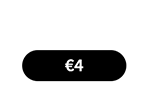 |
Total innsats Totalbeløpet du spiller med i denne runden. Eksempel: |
 |
Innsats Velg innsatsbeløp per linje. + Øker innsatsbeløpet |
 |
Spill Klikk på Spill-knappen for å starte spillet. |
 |
Linjer Viser antall innsatslinjer du spiller med. + Øker antall innsatslinjer (gjelder kun visse spill). |
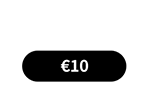 |
Total gevinst Viser gevinstbeløp for hvert spill. |
 |
Lyd
Klikk for å slå av/på lyd. |
 |
Spillregler
Klikk for å lese reglene for dette spillet. |
 |
Pengesaldo
Din totalsaldo (penger du har satt inn på kontoen din). |
 |
Gjør innskudd
Foreta et innskudd og legg til midler på kontoen din. |
 |
Tilbake til lobby
Tilbake til lobby |
Slot button (mobile) - Lithuania
| Spillknapper | |
 |
Spill Klikk på Spill-knappen for å starte spillet. |
 |
Autospill Spillet er i autospill-modus og viser antall gjenværende runder du har å spille. |
 |
Stopp autospill Klikk på denne knappen for å stanse autospill-modus. Spillet stanses ved slutten av den gjeldende runden. Antall gjenværende runder vises i knappen.
|
 |
Turbospill Spillet er i Turbomodus. (For å stanse turbospill, klikker du på menyknappen, velger Spillinnstillinger og skyver turbospill-glideren til av.) Merk: Hvis du har aktivert både autospill og turbo, vil Stopp autospill-knappen kun stanse autospill-funksjonen |
 |
Hjem Avslutt spillet og gå tilbake til spillobbyen. |
 |
Lekepengesaldo Din totalsaldo (dette er lekepenger som kan brukes til å spille i demomodus). |
 |
Pengesaldo Din totalsaldo (penger du har satt inn på kontoen din). |
 |
Total gevinst Viser gevinstbeløp for hvert spill. Eksempel: Antall innsatslinjer = 5, innsatsbeløp = 4 4 x 5 = 20
Totalinnsats = 20 |
 |
Total innsats Totalbeløpet du spiller med i denne runden. |
 |
Gjør innskudd
Foreta et innskudd og legg til midler på kontoen din. |
 |
Spill med penger Spill med penger-knappen vises når du spiller i lekemodus. Klikk for å gå til ekte spillmodus og spill med ekte penger.
|
 |
Meny Klikk på menyknappen for å vise eller endre spillinnstillingene. |
| Innsatsinnstillinger |  |
 |
Total innsats Totalbeløpet du spiller med i denne runden. |
 |
Innsats Velg innsatsbeløp per linje. + Øker innsatsbeløpet |
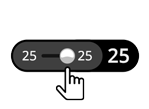 |
Linjer Viser antall innsatslinjer du spiller med. + Øker antall innsatslinjer (gjelder kun visse spill). |
 |
Tilbake Tar deg tilbake til spillet. |
| Spillinnstillinger |  |
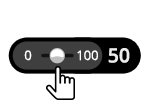 |
Autospill Spillet spilles i automodus og viser antall spill du har valgt. |
 |
Turbo
|
| Lyd |
|
 |
Lyd
|